ちょっとだけこなれてきたのでwordpressに続いて、今度はわりと自力でredmineのDocerfileを作ってみた。イメージならDocker Hubにあるんだけど、やっぱりエンジニアを目指すなら自分で作ってみたいじゃない。
CentOSにredmineを入れるHow to で、手順のベースにしたサイトはこちら
今回ももちろん色々とググって試行錯誤しながら作ったんだけど、見ているのが自分のサイトと気づかずに自分のサイトを読んでいたマヌケちゃんは今回が初めてかも・・・。
試行錯誤のようなDockerfileなので見た目とかプロトタイプ的なところはありますが、とりあえず公開。
環境から
$ cat /etc/os-release
NAME=CoreOS
ID=coreos
VERSION=386.1.0
VERSION_ID=386.1.0
BUILD_ID=
PRETTY_NAME="CoreOS 386.1.0"
ANSI_COLOR="1;32"
HOME_URL="https://coreos.com/"
BUG_REPORT_URL="https://github.com/coreos/bugs/issues"
$ docker version
Client version: 1.1.1
Client API version: 1.13
Go version (client): go1.2
Git commit (client): dc62f3c
Server version: 1.1.1
Server API version: 1.13
Go version (server): go1.2
Git commit (server): dc62f3cDockerfile
$ cat docker-redmine/conf/Dockerfile
FROM centos:centos6

MAINTAINER takeken

# yum + repo
RUN yum install -y wget
RUN yum install -y sudo tar openssh openssh-clients openssh-server syslog httpd httpd-devel mysql-server vim python-setuptools
RUN sleep 60
RUN wget http://rpms.famillecollet.com/enterprise/remi-release-6.rpm ;\
  wget http://dl.fedoraproject.org/pub/epel/6/x86_64/epel-release-6-8.noarch.rpm ;\
  wget http://pkgs.repoforge.org/rpmforge-release/rpmforge-release-0.5.3-1.el6.rf.x86_64.rpm ;\
  rpm -ivh epel-release-6-8.noarch.rpm remi-release-6.rpm rpmforge-release-0.5.3-1.el6.rf.x86_64.rpm
RUN yum --enablerepo=remi,epel groupinstall -y "Development Tools"
RUN yum --enablerepo=remi,epel,centosplus install -y openssl-devel readline-devel zlib-devel curl-devel libyaml-devel ImageMagick ImageMagick-devel ipa-pgothic-fonts mysql-devel

# ssh
RUN sed -ri 's/UsePAM yes/#UsePAM yes/g' /etc/ssh/sshd_config
RUN sed -ri 's/#UsePAM no/UsePAM no/g' /etc/ssh/sshd_config
RUN ssh-keygen -t rsa -f /etc/ssh/ssh_host_rsa_key
RUN ssh-keygen -t dsa -f /etc/ssh/ssh_host_dsa_key
RUN useradd takeken
RUN echo 'takeken:takeken' | chpasswd
RUN echo 'takeken ALL=(ALL) NOPASSWD:ALL' >> /etc/sudoers.d/takeken

# ruby
RUN curl http://cache.ruby-lang.org/pub/ruby/2.0/ruby-2.0.0-p451.tar.gz | tar -xz -C /tmp
RUN cd /tmp/ruby-2.0.0-p451 ; ./configure --disable-install-doc && make && make install
RUN cd /tmp/ruby-2.0.0-p451/ext/openssl ; ruby extconf.rb ; make ; make install
RUN cd /tmp/ruby-2.0.0-p451/ext/zlib ; ruby extconf.rb ; make ; make install
RUN gem install bundler --no-rdoc --no-ri

# setting
# RUN sed -ri "s/^SELINUX=enforcing/SELINUX=disabled/" /etc/sysconfig/selinux

# supervisor
RUN easy_install supervisor
RUN echo_supervisord_conf > /etc/supervisord.conf
RUN echo '[include]' >> /etc/supervisord.conf
RUN echo 'files = supervisord.d/*.conf' >> /etc/supervisord.conf
RUN echo '[inet_http_server]' >> /etc/supervisord.conf
RUN echo 'port=0.0.0.0:9001' >> /etc/supervisord.conf
RUN echo 'username=takeken' >> /etc/supervisord.conf
RUN echo 'password=takeken' >> /etc/supervisord.conf
RUN mkdir -p /etc/supervisord.d
ADD set.conf /etc/supervisord.d/set.conf

#mysql
RUN service mysqld restart && \
  /usr/bin/mysqladmin -uroot password takeken
RUN service mysqld restart && \
  mysql -uroot -ptakeken -e "CREATE DATABASE redmine; GRANT ALL PRIVILEGES ON redmine.* TO 'redmine'@'localhost' IDENTIFIED BY 'redmine'; FLUSH PRIVILEGES;"

# redmine
RUN curl  http://www.redmine.org/releases/redmine-2.5.0.tar.gz | tar -xz -C /tmp
RUN mv /tmp/redmine-2.5.0 /var/lib/redmine
RUN mkdir -p /var/lib/redmine/config
ADD configuration.yml /var/lib/redmine/config/configuration.yml
ADD database.yml /var/lib/redmine/config/database.yml

RUN cd /var/lib/redmine ; bundle install --without development test postgresql sqlite ;\
  RAILS_ENV=production bundle exec rake db:migrate ;\
  gem install passenger --no-rdoc --no-ri ;\
  bundle install
ADD passenger.conf /etc/httpd/conf.d/passenger.conf
RUN sed -ri 's_DocumentRoot.*_DocumentRoot /var/lib/redmine/public_' /etc/httpd/conf/httpd.conf
RUN passenger-install-apache2-module --auto
RUN service mysqld restart
RUN cd /var/lib/redmine ; bundle exec rake generate_session_store ; bundle exec rake generate_secret_token ; bundle install
RUN sleep 60
RUN /etc/init.d/mysqld start && cd /var/lib/redmine ; bundle exec rake db:migrate RAILS_ENV=production ;\
  rake tmp:cache:clear ; rake tmp:sessions:clear

RUN chown -R apache:apache /var/lib/redmine
EXPOSE 22 80 9001

CMD ["/usr/bin/supervisord"]
configuration.yml
$ cat docker-redmine/conf/configuration.yml
production:
  email_delivery:
  delivery_method: :smtp
  smtp_settings:
   address: "localhost"
   port: 25
   domain: 'example.com'

  rmagick_font_path: /usr/share/fonts/ipa-pgothic/ipagp.ttf
database.yml
$ cat docker-redmine/conf/database.yml
production:
  adapter: mysql2
  database: redmine
  host: localhost
  username: redmine
  password: redmine
  encoding: utf8
passenger.conf ※これは時期とか環境によって変わるはずです。
$ cat docker-redmine/conf/passenger.conf
LoadModule passenger_module /usr/local/lib/ruby/gems/2.0.0/gems/passenger-4.0.48/buildout/apache2/mod_passenger.so
<IfModule mod_passenger.c>
  PassengerRoot /usr/local/lib/ruby/gems/2.0.0/gems/passenger-4.0.48
  PassengerDefaultRuby /usr/local/bin/ruby
</IfModule>
set.conf
$ cat docker-redmine/conf/supervisor.conf
[supervisord]
nodaemon=true

[program:sshd]
command=/usr/sbin/sshd -D
autostart=true
autorestart=true

[program:httpd]
command=/usr/sbin/httpd -D FOREGROUND
autostart=true
autorestart=true

#command ha docchika ??
[program:mysqld]
command=/usr/bin/pidproxy /var/run/mysqld/mysqld.pid /usr/bin/mysqld_safe --datadir=/var/lib/mysql --socket=/var/lib/mysql/mysql.sock --pid-file=/var/run/mysqld/mysqld.pid --basedir=/usr --user=mysql
#command=/usr/bin/mysqld_safe --datadir=/var/lib/mysql --socket=/var/lib/mysql/mysql.sock --pid-file=/var/run/mysqld/mysqld.pid --basedir=/usr --user=mysql
autostart=true
autorestart=true
相変わらずセキュリティ面はあまり考慮していないので、あくまでベースとして使ってください。
起動してアクセスするとこの画面になります。
$ docker run -p 80:80 -p 22 -p 9001 -d take/red /usr/bin/supervisord
0d82ad5a75c902d05dd9d2b59482cb40503a4214b3644e7db724e907a08f4152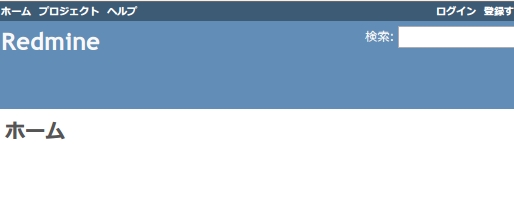
デフォルトなので、ログイン・パスワードともにadminです。
あいかわらずrubyは知らないけど、これでredmineもお手軽に使えますね。
じゃねー。
らささべさん
>#新規プロジェクトの”説明”に日本語を入れたりすると、文字化けします。
わー、ほんとですね(泣)プロトタイプとしても、これは詰めが甘い・・・(´・ω・`)
情報ありがとうございます。
HEREDOCの変わりの/tmpからリダイレクトするテクニックは素晴らしいですね。
公開するのは一時の恥という事で、精進します。
コメントありがとうございました。(^^)
このDockerfileのままだと、Mysqlのdbがlatinで作られて日本語が化けました。
#新規プロジェクトの”説明”に日本語を入れたりすると、文字化けします。
色々調べてみると、こんな風に解決するのがデフォみたいです。
http://linuxserver.jp/%E3%82%B5%E3%83%BC%E3%83%90%E6%A7%8B%E7%AF%89/db/mysql/%E6%96%87%E5%AD%97%E5%8C%96%E3%81%91%E8%A7%A3%E6%B6%88.php
てことで、うちで試したときは Dockerfile を一部修正させてもらって
% diff Dockerfile.original Dockerfile
47a51,53
> RUN mkdir -p /etc/mysql.d
> ADD files/my_additional.cnf /etc/mysql.d/my_additional.cnf
> RUN echo ‘!includedir /etc/mysql.d’ >> /etc/my.cnf
で、my_additional.cnf に
[client]
default-character-set=utf8
[mysql]
default-character-set=utf8
[mysqld]
skip-character-set-client-handshake
character-set-server = utf8
collation-server = utf8_general_ci
init-connect = SET NAMES utf8
と書いておくと、日本語で説明を書いても上手くいきました。
こちらからは以上です。
Dockerfile参考にさせてもらってます。
45行目の set.conf は supervisor.conf ですかね。
あと
https://github.com/docker/docker/issues/1554
にあるみたいに、DockfileにHEREDOCが書けたら嬉しいですよね。
(38~43行目みたいなところが一瞬で終わるので)
いつかDocker側が対応してくれたらいいなぁと思います。
今は /tmp に ADD してcat tmp.txt >> /etc/superviser.conf みたいな方法しか思いつきませんでした。